Building a 0-to-1 Smart Legal Product Experience System (Ping An)
Mar 2020 - Jul 2020
Product Designer
20 mins
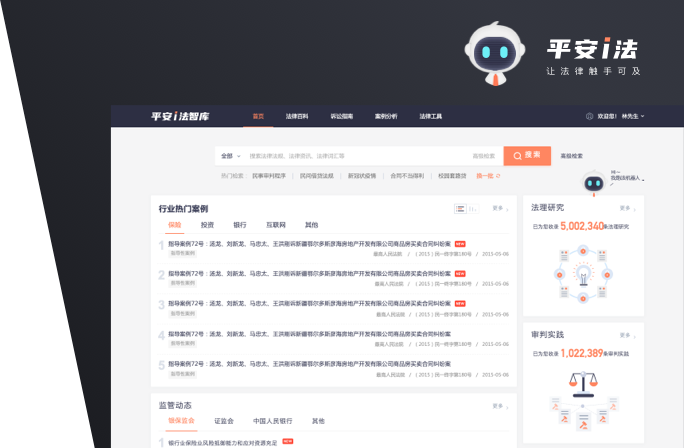
Ping An i-Law is a product upgrade — not the original tool-based legal services platform. Leveraging Ping An's diversified financial scenarios and technological strengths, it integrates precise case and regulation retrieval, personalized professional content recommendations, an authoritative and comprehensive legal knowledge graph, judicial practice references, and multi-dimensional case feature reasoning and similar-case intelligent matching. It is a professional, integrated, intelligent, open, and efficient legal information service platform.

"Bring more user-centered thinking and product digitization to the platform's development. Refine product positioning and target audience to improve the overall product experience."
"Time-consuming searches on legal platforms?" "High error rates in legal document retrieval?"
When I first took on the project, in addition to the initial feedback from business stakeholders and users mentioned above, we also conducted a preliminary walkthrough of the product. We identified the following issues: 1) Inconsistent interaction experience; 2) Non-standardized component reuse causing confusing experiences; 3) Users getting lost on the site, often unable to feel in control of their progress; 4) No differentiation between operation states; 5) Components overlapping and obscuring each other; 6) Misalignment with actual workflows; 7) High learning curve; 8) Disconnected features and narrow use scenarios. For these preliminary issues, we formed some initial response strategies.
1) Aligning on problem awareness: Tried new methods such as interviews and focus groups to help business stakeholders reach a shared understanding of existing problems and collaboratively define business goals. 2) Becoming a rapid domain expert: Lacking legal knowledge made it difficult to get started. With the help of expert judges from the risk control department and colleagues, I gained a working understanding of legal processes and knowledge, which helped build out the business structure. This ultimately helped the product team successfully complete the product upgrade.
Over the 4-month product design upgrade cycle, the entire process was guided by a combination of Design Thinking and Lean Startup methodologies. Design Thinking focused on problem analysis and definition, while Lean emphasized effectively translating problems into solutions. By leveraging the strengths of both models, we were able to smoothly drive the product transformation. Through this model, we clarified the key steps to focus on and better facilitated the product upgrade, as shown in the diagram below.

The previous user segmentation only included professional users. We first enriched the personas for professional users. Additionally, this product cycle aimed to expand reach to general users, enabling the product to be used across various internal company scenarios — increasing internal enablement and exploring future possibilities for external output. The design team re-researched the product's user base, identified discrepancies between the target new users and the original users, and redrew the new audience personas. Research methods included online surveys and offline field visits. Online surveys gathered general users' legal needs and usage scenarios. During offline visits, we interviewed grassroots-level court judges, legal staff at various subsidiary companies, and judicial workers at procuratorates. This extensively documented and profiled users' legal need scenarios, replicating real work contexts within the product so it could become a truly effective legal tool. For professional users, we engaged 19 domain workers aged 28–52 with clearly defined legal needs. For this group, we would provide: 1) More precise and efficient retrieval tools to satisfy their need for accurate legal document searches and knowledge collection. 2) Greater attention to design accessibility across age groups for a more friendly experience. For general users, we engaged 7 users aged 28–48 without clearly defined legal needs. For this group, we would provide: ample browsing space, with a focus on browsing experience and data timeliness — guiding them from casual exploration of legal knowledge toward clearly defined legal needs. Research conclusions are shown below:

Based on a deep understanding of users and deep empathy across age groups, the design considerations for i-Law Think Tank were clearly defined and consistently carried through the product design.


Centered around the user goal of "understanding how courts rule on a particular type of case," by uncovering the essential nature of user expectations, we discovered new ideas and innovation points. Providing an efficient retrieval tool alone is far from sufficient. Therefore, the user goal was decomposed into 5 user task categories to comprehensively elevate the legal knowledge service experience:

Starting from real-world scenarios, we planned features according to pre-litigation, during-litigation, and post-litigation needs. Scenario-based planning makes features easier to find. Isomorphic migration improves scenario coverage; through scenario summarization, we supplemented low-development-cost, high-frequency tools and functions.


The existing search experience was barely adequate. The goal of this redesign was to improve search accuracy, confirmability, and efficiency — and to deliver a differentiated search experience compared to similar products. We first optimized the search bar to provide users with retrieval methods that break down experience barriers and offer richer knowledge associations, improving data penetration.

Next, to ensure clear and precise data communication, we reorganized the left filter panel on the search results page — determining the optimal number of filter cards to reduce information noise and maintain concise, efficient search, improving the overall search experience.

Additionally, a search state was added to the left filter panel cards. Taking case causes as an example — there are approximately 3,000 multi-level case causes in total, and a keyword may be associated with hundreds of causes during retrieval, making the left filter panel very inefficient. After adding search interaction logic to the filter card components, users can quickly locate the relevant cause among many options. This logic applies to other filter cards as well, significantly reducing overall search time.

To preserve user search habits as much as possible and solidify users' frequently used retrieval paradigms, we designed the logic to save search conditions — retaining user habits and improving search capability.

Effective grouping for display: different document content types are browsed under different groups, improving reading efficiency.

During offline research, we found that legal professionals such as grassroots court judges and prosecutors typically use Song typeface for legal documents. To prevent a disconnect from real work reading contexts, we used Source Han Serif for the titles of retrieved documents, restoring the authentic reading experience from real work settings. Right-side search result linking builds knowledge extension and association, adding contextual and informational interconnection. We then upgraded the reading experience for retrieved document details once more — improving reading accessibility by adjusting font sizes, embedding some browser functions natively, and accommodating users with different abilities and habits. Cross-platform considerations were also included, allowing users to scan a QR code from the web to continue reading on mobile.

To enhance reading continuity, search keywords are highlighted on both the search results page and the detail page, ensuring clear contextual cues throughout the reading experience with no interruptions.

This upgrade also redefined and improved the onboarding process to enhance user acquisition and conversion.


To better track design outcomes, multiple measurement methods were adopted. One was adapting Nielsen's Severity Rating formula — adjusting the coefficients of three variables to fit this product — to measure the severity and urgency of issues found in product details, and then prioritizing issues accordingly.

On the other hand, we built and integrated a user feedback channel mechanism plan. Through channels such as the site-wide i-Law consultation FAB, personal center, and post-search result feedback, we established a platform user feedback mechanism to ensure effective and unobstructed communication with users to correct deviations.


Another concurrent measurement effort was acceptance testing. The project had only a small number of users at launch. Through emails, morning meeting announcements, new user groups, and other channels, we initiated product promotion. We also launched a second round of user satisfaction research after the redesign. Users with varying experience levels were sampled from backend data and divided into a free testing group and a one-on-one satisfaction evaluation group, to assess whether the iterated version met the product's target expectations. View the UAT testing mechanism.
Two weeks after the new version launched, overall user satisfaction improved by 23%. The primary driver of improved product perception was the clearer site navigation. User feedback will be incorporated into the iteration plan and walkthrough checklist for further optimization.

After three months of research, synthesis, design, and promotion, we obtained July user data. From a user data perspective, active users in July reached 2,148, representing a month-over-month increase of 913.2%. There is still significant room for growth in the existing user base. Meanwhile, further thinking began for August's user data, with a focus on tracking user retention — continuously providing users with value so they keep returning to the product.


This project lasted four months. With the product manager role often underrepresented, our team faced higher demands and greater challenges. This meant participating more, taking on more responsibility, and thinking more deeply. In these six short months, I gained tremendously and received positive recognition from the group's product teams. This also gave rise to our distinctive product design methodology. Playing the product manager role: understanding and helping to organize business models, planning product services and features from a value perspective, and conducting business evaluations. Playing the user researcher role: organizing user models and competitive research, mapping complex business processes, and reviewing product design through data. Playing the interaction designer role — and playing it well: using design to solve business pain points, visualizing complex business logic, collaborating with engineering on design execution, and working with visual design on fidelity and walkthrough. Providing the best possible design solution under constrained development resources — delivering a practical, efficient retrieval tool experience. Some seemingly simple flows are in fact the crucial first step in establishing user trust. For designers in new environments, the challenges and changes we face will only grow, as will the constraints. Embracing change and innovation, and demonstrating more multi-dimensional and abstract thinking and coordination skills, is a required course for all designers in new environments. Growing alongside partners and projects, and co-creating business value together.